
Call Blocker - Block Numbers
Spam Call Blocker AppsCommunication
4.15.35K Reviews
- Version
- 3.5.0.1948
- Installs
- 5.00M
- Age Rating
- Everyone
Screenshots
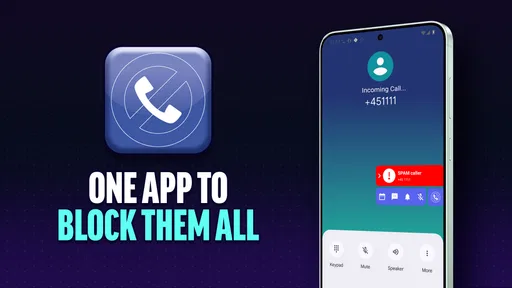
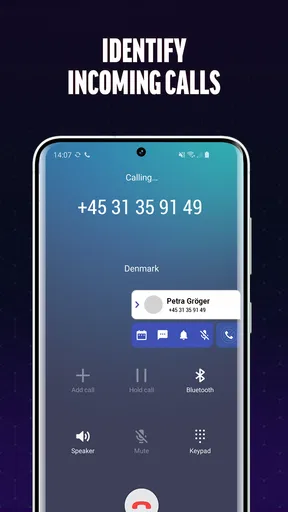
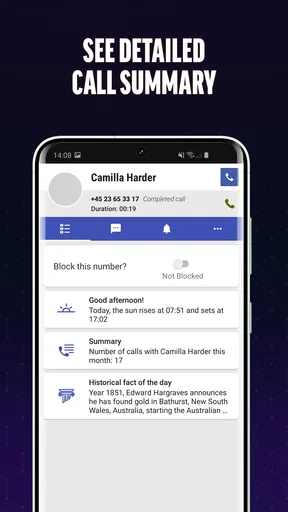
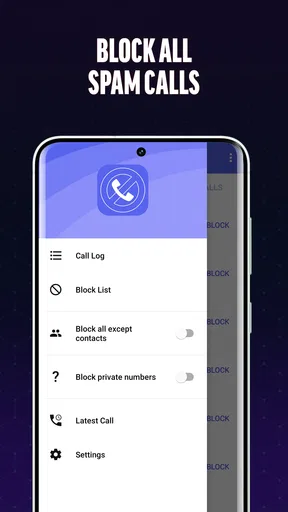
Our Review of Call Blocker - Block Numbers
 Analysis by Appyee
When an unknown number interrupts a meal, a work call or a quiet evening, I want a way to make a quick decision rather than keep answering and hoping for the best. Call Blocker - Block Numbers is a communication app built around that simple problem: giving me control over which calls reach my phone. Its appeal is less about transforming how I use my device and more about reducing a recurring nuisance with rules I can adjust.
What to expect when setting it up
The first useful choice is deciding how strict you want to be. A blacklist is a practical starting point when a particular number keeps calling: block that caller without changing how unfamiliar numbers behave. A whitelist offers the opposite kind of control by protecting contacts you want to hear from. I’d begin with the narrowest rule that solves the problem, then broaden it only if unwanted calls continue. That helps avoid the common trade-off of quieting spam at the cost of missing a legitimate call.
There are also options for calls from unknown or private numbers. They can be helpful if interruptions from unidentified callers are frequent, but they deserve more thought than blocking one repeat nuisance. A delivery driver, clinic or new client may call from a number that is not saved in your contacts. If you rely on incoming calls for work or appointments, I would avoid enabling broad restrictions until you have considered how often those people use unfamiliar numbers.
Setup is described as straightforward, with the app guiding users through permissions and settings. Call-filtering tools need the relevant phone access to do their job, so I would read each prompt and check the selected rules rather than simply tapping through. The best setup is not necessarily the strictest one; it is the one that screens the calls you do not want while leaving a sensible route for important people to reach you.
How it fits into an ordinary day
A realistic use case is a person who keeps receiving repeat calls from the same unwanted number while waiting for calls from a school or a repair service. I would add the repeat caller to the blacklist, leave the unknown-number rule off for now, and keep the school and repair service able to call normally. If the interruptions continue from different numbers, I could then consider a broader setting, knowing that it may also catch calls I would otherwise answer.
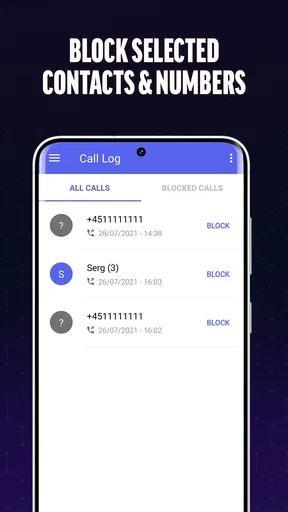
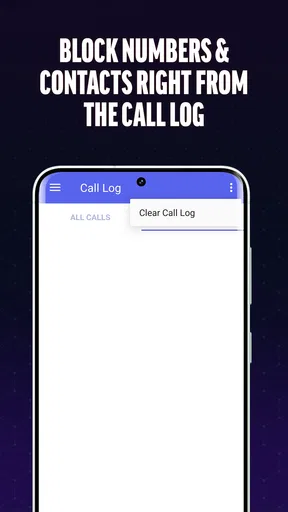
The app’s call log gives blocked calls a useful second look. Instead of treating every blocked attempt as invisible, I can review the list later when it is convenient. That is a better fit for someone who wants fewer interruptions but still wants to check whether a call might have mattered. I would make reviewing the log part of a light routine, especially after turning on a broader filter, rather than assume that every blocked call was unwanted.
Notifications can be tailored, including silent alerts or no alert. That matters if the goal is to reduce interruptions rather than replace one ring with a stream of notices. A quiet notification setting can keep the history available without demanding attention each time. On the other hand, someone who needs to monitor screening closely may prefer to keep an alert so they notice when the rules are catching calls.
Useful control, with a few trade-offs
The whitelist and blacklist make the app more flexible than a single on-or-off blocking switch. I see the whitelist as a safeguard for people who use stricter filters, while the blacklist is the cleaner choice for targeted blocking. Keeping those roles distinct makes it easier to understand why a call is allowed or stopped and to correct a rule if the results are not what you expected.
Backing up those lists is a thoughtful convenience if you change devices and want to preserve the rules you have built. It also suggests a useful habit: keep the lists deliberate rather than adding every unfamiliar caller in a hurry. A list that is easy to maintain is more valuable than a large one full of numbers you no longer recognize. Before relying on a backup after changing phones, I would still check that the rules and contacts behave as expected on the new device.
Compared with relying only on a phone’s built-in blocking tools, a dedicated call blocker gives more attention to lists, categories and blocked-call history in one place. The built-in option may be enough if you only need to silence one or two numbers, and it avoids adding another app to manage. For someone who wants both targeted lists and broader categories, this app’s focused approach is more appealing. It is not a substitute for judgment: broad screening can be too blunt when important callers are not saved in advance.
Who is likely to get the most from it
I’d recommend it most to people who receive recurring nuisance calls and want to set rules once, then check results when it suits them. It can also suit someone who shares a phone with a family member and wants a clear, reviewable way to manage blocked attempts, provided the people using the device agree on how strict the filters should be. The app is free to install, with in-app purchases listed from $2.99 to $19.99 per item, so I would look over any purchase choice carefully and decide whether the free experience already covers my needs.
It is less suitable for anyone who cannot risk missing a call from a new number, such as a person expecting time-sensitive calls from a service provider or a prospective employer. In that situation, a phone’s more selective built-in blocking tools may be safer than rules that catch unknown or private callers. If your unwanted calls are rare and easy to block individually, the extra settings may also be more management than you need.
Your Personal Call Guardian
Let’s face it, we all have those moments when our phone rings, and we immediately roll our eyes because it’s another spam call. Call Blocker - Block Numbers steps in right here to save the day. This app’s main job is to keep those pesky calls at bay, and it does so with a pretty impressive set of features.
Setting It Up
Getting started with this app is as easy as pie. Once you’ve downloaded and installed it, the setup process is straightforward. The app guides you through permissions and settings, ensuring that it integrates seamlessly with your phone. I appreciated how intuitive the process was, even for someone who’s not exactly tech-savvy.
Features That Stand Out
What makes Call Blocker - Block Numbers shine is its robust feature set. You can create a blacklist, which is essentially a list of numbers you never want to hear from again. The app also offers a whitelist for those important contacts who should always get through.
One feature that I found particularly nifty is the ability to block calls based on categories like "Unknown Numbers" or "Private Numbers." This is super handy when you want to avoid any calls from people who aren’t on your contact list.
User Experience
Using the app is a breeze. The interface is clean and user-friendly, making navigation simple. Everything is laid out clearly, so you don’t have to dig through menus to find what you need. It’s evident that the developers focused on making the app as accessible as possible.
Notifications are another area where the app excels. You can customize how you’re alerted about blocked calls, choosing from silent notifications or even no notification at all if you prefer peace and quiet.
Performance and Reliability
In terms of performance, the app runs smoothly without any noticeable lags. It efficiently filters unwanted calls without impacting my phone’s performance. During my time using it, I didn’t experience any crashes or glitches, which is always a plus.
For speed, I’d set expectations around the simplicity of the job: this is a rule-based call filter, not a tool that needs me to review every call before deciding what to do. Once I have chosen a rule, the point is to let it handle matching calls in the background. I would not treat that as a guarantee that every unwanted caller will be caught, though; a blocked list is most useful against numbers I have identified, while category rules involve a broader compromise.
When call volume gets busy
The app’s value becomes clearer during a stretch of repeated interruptions, when stopping to reject every call would be frustrating. I’d add known repeat callers as they appear, then leave the phone alone and check the call log later. That workflow keeps decisions deliberate: I am not hurriedly blocking a number in the middle of a meeting, and I still have a chance to inspect what was filtered afterward.
For someone who expects calls from many new people, the same heavy-use moment can expose the main weakness of category blocking. If a busy day includes couriers, appointments and unsaved work contacts, treating all unknown callers alike may create more follow-up than it saves. I would keep broad rules for periods when silence matters more than availability, and return to targeted blocking when I need to be reachable. The app’s categories are useful controls, not a substitute for choosing the right level of access.
One practical tip is to make changes one at a time. If I add several numbers and enable a broad category all at once, it becomes harder to tell which choice stopped a call I wanted. Changing one setting, then checking the log and adjusting if needed, makes the results easier to interpret. It is a small bit of patience that can prevent an over-aggressive setup from becoming a reason to turn the app off altogether.
Reliability depends on the rules you choose
A call blocker is only as dependable as its settings and the phone environment it runs in. The app offers lists and categories, so I would periodically revisit them rather than assume an old rule still fits. A number that was unwanted once may later belong to a service I need, and a whitelist is only helpful if it reflects the contacts I actually trust. Reviewing the log is the useful recovery step: if someone says they tried to call, I can look for a blocked attempt and reconsider the rule instead of guessing.
There is also a difference between filtering calls and solving the broader problem of spam. Blocking a number can reduce interruptions from that caller, but it does not mean every future call will come from the same number or that every suspicious caller will be identified automatically. I would use the app as a practical layer of control, while continuing to be cautious about unfamiliar calls and not sharing sensitive information just because a call gets through.
Device fit and ongoing upkeep
The app is listed for Android devices running version 10 or later, which makes the operating-system requirement worth checking before installing. Call handling can depend on how a device manages phone functions and app access, so after setup I would make a test call from a number covered by a rule and confirm that the outcome matches what I intended. If filtering changes after a system update or device change, revisiting permissions and rules is a more useful first step than immediately rebuilding every list.
As a free communication app from Spam Call Blocker Apps, it has an average rating of 4.3 from around 43,000 ratings, with over 5 million installs and about 4,900 written reviews. It first appeared on August 25, 2017, and version 2.8.0.1683 is the current release. Those figures suggest it has found a sizeable audience, but popularity alone does not tell me whether its rules suit my calling habits; the better test is whether I can block nuisances without losing calls I care about. It is rated for Everyone.
Additional Perks
Beyond call blocking, the app offers some extra goodies. For instance, you can back up your blacklist and whitelist, so if you ever switch devices, you won’t have to start from scratch. This is a thoughtful feature, especially for those of us who like to keep things organized.
Another cool feature is the "Call Log" where you can review blocked calls. It’s a nice touch if you’re curious about who’s trying to reach you without your permission.
My Final Thoughts
So, is Call Blocker - Block Numbers worth downloading? Absolutely. It’s a reliable and effective solution for managing unwanted calls, and it does so without requiring much effort on your part. The ability to customize settings to fit your needs is the cherry on top.
If you’re tired of spam calls and need something to handle the dirty work for you, give this app a shot. It’s like having a personal bouncer for your phone. Trust me, your peace of mind will thank you.
For me, the best reason to try it is the combination of targeted blocking, optional broader rules, and a log that lets me check what happened afterward. I would start conservatively, keep the blocked-call history available, and widen the filter only if the nuisance justifies the risk of missing legitimate callers. That approach makes the app easier to trust than turning every restriction on at once.
Ready to reclaim your phone from unwanted interruptions? You can download Call Blocker - Block Numbers directly from your app store and start enjoying a quieter, more serene mobile experience.
Privacy and Permissions
See what permissions an app requests and how it handles your data.
- Contacts
- read your contacts, modify your contacts
- Location
- approximate location (network-based), precise location (GPS and network-based)
- Phone
- directly call phone numbers, read call log, read phone status and identity
- Wi-Fi connection information
- view Wi-Fi connections
- Device ID & call information
- read phone status and identity
- Other
- view network connections, read battery statistics, connect and disconnect from Wi-Fi, full network access, change your audio settings, run at startup, draw over other apps, control vibration, prevent device from sleeping, Google Play license check
Verdict
Strengths of Call Blocker - Block Numbers
- Easy to set up and use interface.
- Allows blocking of unknown numbers.
- Customizable block lists for users.
- Minimal impact on battery life.
- Provides detailed call history reports.
Limitations of Call Blocker - Block Numbers
- Limited advanced features in free version.
- Occasional false positives in blocking.
- May conflict with some phone models.
- Ads present in the free version.
- Requires frequent updates for optimal performance.
Similar Picks in This Category
View All
Google Messages
Google LLC4.6

Gmail
Google LLC4.1

Google Meet
Google LLC4.4

Google Chrome
Google LLC4.1

WhatsApp Messenger
WhatsApp LLC4.6

Carrier Services
Google LLC4.2
Frequently Asked Questions
What features does Call Blocker - Block Numbers offer?
Call Blocker - Block Numbers provides a comprehensive suite of features designed to give users control over who can contact them. The app offers options to block specific numbers, unknown callers, and even entire area codes. Users can also create personalized block lists and receive notifications for blocked calls.
Is Call Blocker - Block Numbers easy to use?
Yes, Call Blocker - Block Numbers is designed with user-friendliness in mind. The intuitive interface allows users to quickly navigate through settings and configure their block lists with ease. Whether you're tech-savvy or a beginner, you'll find the app straightforward to use.
Does the app drain the phone's battery significantly?
Call Blocker - Block Numbers is optimized for performance and runs efficiently in the background, ensuring minimal impact on battery life. While any app running continuously can have some effect, most users report negligible battery drain, making it suitable for everyday use.
Can I customize notifications for blocked calls?
Yes, the app allows users to customize how they are notified about blocked calls. You can choose to receive alerts, view a call log, or simply let the app silently block calls without any notification. This flexibility lets you manage distractions according to your preferences.
Is Call Blocker - Block Numbers compatible with both Android and iOS devices?
Call Blocker - Block Numbers is available for both Android and iOS platforms. The app is regularly updated to ensure compatibility with the latest versions of these operating systems, providing a seamless experience across different devices.
